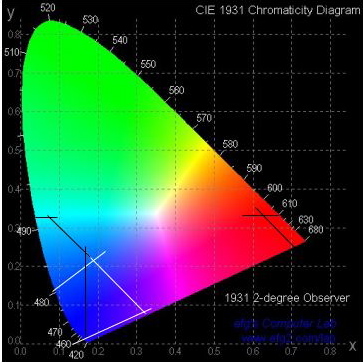
The red boundaries are obvious, but the blue need a little explanation. The "Restricted Blue" boundaries are shown by white lines, while the "Signal Blue" boundaries are shown by the black lines in the obviously blue corner.
| MadSci Network: Physics |
I did some digging into the colors used by police departments in their beacon lights, and discovered that every police department I investigated uses the colors defined by SAE (Society of Automotive Engineers) Standard J578 (or J578D). To find this information I used the "Google" Internet search engine and searched on "police beacon". I went to my local university's engineering library (the Vesic Library at Duke University in Durham, NC) and found the following from the SAE Standard:
The red beacon must have chromaticity coordinates bounded by the following lines on the
1931 CIE Chromaticity diagram (You can find some interesting information about the CIE
diagrams
here.):
Red Beacon:
y = 0.335 (yellow boundary)
y = 0.980 - x (purple boundary)
The blue beacon is a little uncertain, because there are two different blues that can be
used. The first blue, "Restricted Blue", is recommended when the beacon must be recognized
positively as being blue:
For the Restricted Blue Beacon:
y = 0.070 + 0.810 x (green boundary)
x = 0.400 - y (white boundary)
x = 0.130 + 0.600 y (violet boundary)
The second blue, "Signal Blue", is okay to use if it is not always necessary to identify it
as blue:
For the Signal Blue Beacon:
y = 0.320 (green boundary)
x = 0.160 (white boundary)
x = 0.400 - y (white boundary)
x = 0.130 + 0.600 y (violet boundary)
[end of info from the SAE Standard]
I have superimposed these boundaries on a picture of the 1931 CIE Chromaticity Diagram,
and you can see my superimposed boundaries in the following image:
The red boundaries are obvious, but the blue need a little explanation. The "Restricted
Blue" boundaries are shown by white lines, while the "Signal Blue" boundaries are shown by the
black lines in the obviously blue corner.
I found an applet (using the "Google" search engine and searching on "CIE Chromaticity")(Since I'm an optical physicist I knew that search would result in some useful hits!!) that allows one to click on three points in the chromaticity diagram and then mix various proportions of those three colors to see what color results. That applet is found here. Using that applet and clicking within the boundaries given above for Restricted Blue and Red (click real close to either the blue or red point for the third point), and then trying various proportions of the colors, I found it impossible to obtain green! I then tried the Signal Blue instead of Restricted Blue, and still could not obtain green, although if the points are chosen to be as close to the boundaries in the direction of green as possible, a sort of "purplish blue with maybe a hint of green" can result. Not very green.
What I think is happening is that the police cars usually also have yellow beacons. If I include yellow in the color gamut applet, I can easily get green, especially if I use the "Signal Blue" rather than the "Restricted Blue". Unfortunately I did not write down the boundaries for yellow in SAE J578 while I was at the library, but any yellow will do. It is quite easy, using "Signal Blue", any yellow, and the beacon red, to obtain a pale green.
Okay, so how does this all tie in to your seeing green? The answer is that at large distances from the police car your eye can not resolve each individual beacon, so all the colors get mixed together on your retina. As you get closer and your eye can resolve each individual beacon you can see the individual colors. (There is a good previous answer in our archives that discusses the resolution limits of our eyes.)
John Link, MadSci Physicist
Try the links in the MadSci Library for more information on Physics.